Netgear EX2700 Setup, Reset, Lights & Firmware Update
Official sources used for this guide
- NETGEAR EX2700 support and downloads
- NETGEAR: Set up a WiFi range extender
- NETGEAR: Troubleshoot access to mywifiext.net
Menus, LEDs and supported features vary by model and firmware. Check the model label and current manufacturer documentation before changing settings.
This dedicated Netgear EX2700 model page covers setup, login, LED meanings, factory reset, firmware update, placement and troubleshooting for the N300 WiFi Range Extender.
EX2700 Model Overview
1. Netgear EX2700 Overview
The Netgear EX2700 is an N300 WiFi range extender. It connects wirelessly to an existing WiFi router or access point and rebroadcasts a WiFi signal to improve coverage in areas where the router signal is weak.
2. Netgear EX2700 Setup
You can complete the Netgear EX2700 setup using WPS or the browser-based setup interface. During the initial setup, keep the extender in the same room as the router.
A. EX2700 Setup with WPS
This is the quickest method when your router supports Wi-Fi Protected Setup.
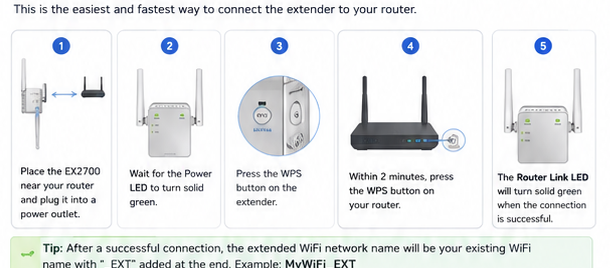
Place the EX2700 near your router and plug it into a power outlet.
Wait for the Power LED to become solid green.
Press the WPS button on the side of the extender.
Within two minutes, press the WPS button on your router or access point.
When the Router Link LED lights, the extender has connected to the router.
B. EX2700 Setup without WPS (Browser Setup)
If WPS is unavailable or you prefer manual configuration, use a browser while connected to the extender.
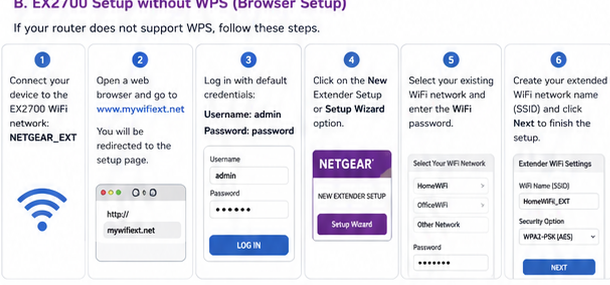
Password: password
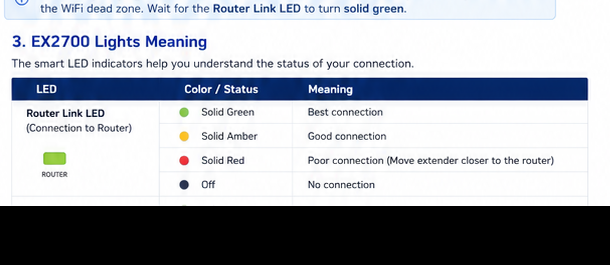
3. Netgear EX2700 Lights Meaning
The EX2700 front LEDs show power, WPS status and the quality of the wireless links.
| LED | Color / Status | Meaning |
|---|---|---|
| Router Link LED Extender ↔ Router | Solid green | Best connection |
| Solid amber | Good connection | |
| Solid red | Poor connection; move the extender closer to the router. | |
| Off | No connection to the router. | |
| Device Link LED Extender ↔ Device | Solid green | Best connection |
| Solid amber | Good connection | |
| Solid red | Poor connection | |
| Off | No connected WiFi device | |
| Power LED | Amber / Green / Off | Amber while booting, green when powered on, off when powered off. |
| WPS LED | Solid / Blinking green / Off | Solid indicates WiFi security enabled; blinking indicates WPS connection in progress. |
4. Netgear EX2700 Login
Connect a computer or mobile device to the extender network, open a web browser and enter www.mywifiext.net. On the original EX2700 interface, the default login is admin for the username and password for the password. If you previously changed the password, use your personalised password instead.
5. Netgear EX2700 Firmware Update
Keeping firmware updated can improve stability and address bugs or security issues. From the EX2700 management interface, open Maintenance → Firmware Upgrade, select Check, and follow the onscreen instructions if a newer firmware file is available. If the interface asks you to choose a firmware file manually, select the downloaded file and upload it.
6. How to Reset Netgear EX2700
A factory reset is useful when the extender cannot be accessed, has incorrect settings or needs to be configured from scratch. The Factory Reset button is on the bottom of the EX2700 near the Ethernet port.
- Leave the extender powered on.
- Use a paper clip or similar pointed object to press and hold the Factory Reset button.
- Wait for the extender to restart.
- Reconnect to NETGEAR_EXT and run the setup again.
A factory reset removes personalised settings and returns the extender to its default configuration.
7. EX2700 Troubleshooting
EX2700 red Router Link LED
A red Router Link LED means the connection between the router and the extender is poor. Move the EX2700 closer to the router and reduce major physical obstructions where possible.
NETGEAR_EXT is not showing
Confirm that the extender is powered on. If the Power LED is off, press the Power button. If the extender was already configured, its WiFi name may no longer be NETGEAR_EXT because the setup process can rename it.
Mywifiext.net does not open
Make sure the device you are using is connected to the extender's WiFi network. The original EX2700 manual also recommends entering the full address with http:// if the login page does not appear.
EX2700 connects but there is no Internet
Re-enter the router WiFi password carefully because it is case-sensitive. Also confirm that the router itself has an active Internet connection and that the extender is close enough to the router to maintain a usable wireless link.
EX2700 Model-Specific Quick Diagnosis
This N300 single-band guide uses the following checks to keep EX2700 troubleshooting distinct from other extender families.
| Observed symptom | EX2700-specific next check |
|---|---|
| Power is on but NETGEAR_EXT is absent | Wait for startup, then reset with power connected and rescan for the default network. |
| WPS does not create an extended network | Confirm the router offers 2.4 GHz WPS; EX2700 does not extend a separate 5 GHz band. |
| Internet works near the router but not through EX2700 | Use the Router Link LED to move the unit closer before changing settings. |
| Wired device has no access | Confirm wireless backhaul is established before testing the EX2700 Ethernet port. |
8. Netgear EX2700 FAQs
What is the default WiFi name for the EX2700?
The factory default SSID is NETGEAR_EXT.
What is the EX2700 default login?
On the original interface documented for this model, the default username is admin and the default password is password.
What does a red light mean on the EX2700?
A red Router Link or Device Link LED indicates a poor wireless connection on that link.
Can I connect a wired device to the EX2700?
Yes. After the extender is connected wirelessly to the router, its Ethernet port can be used to connect a wired device.
Does the EX2700 support seamless roaming?
No. The original EX2700 documentation states that seamless roaming is not supported.