Netgear WN3000RP Setup, NETGEAR_EXT, Link Rate Lights & Reset
Official sources used for this guide
- NETGEAR WN3000RP support and downloads
- NETGEAR: Set up a WiFi range extender
- NETGEAR: Troubleshoot access to mywifiext.net
Menus, LEDs and supported features vary by model and firmware. Check the model label and current manufacturer documentation before changing settings.
WN3000RP is an early Universal WiFi Range Extender with WPS, browser setup through NETGEAR_EXT, a Link Rate LED and a PC-to-Extender status indicator.
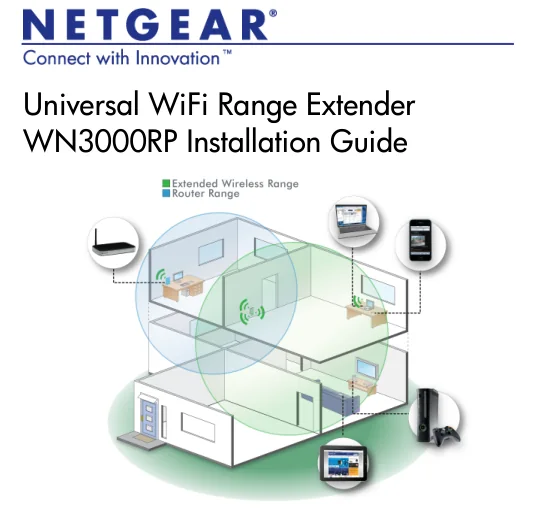
1. Netgear WN3000RP Overview
WN3000RP predates the mesh-style One WiFi Name workflow. Its installation guide instead focuses on choosing a separate extender network and using the Link Rate LED to decide whether the unit is placed too far from the router.
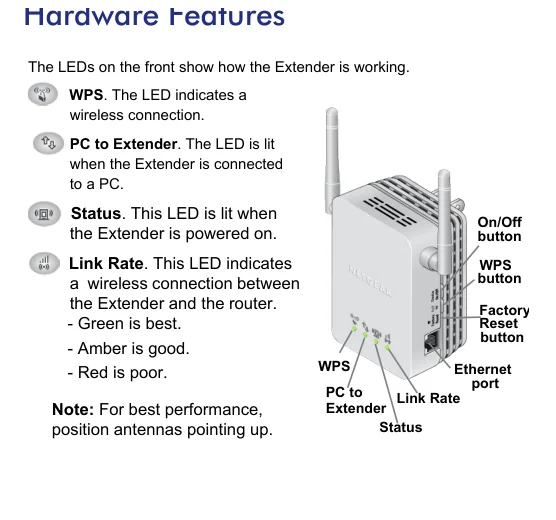
2. Netgear WN3000RP setup Guide
Place WN3000RP between the router and the weak-signal area. Use WPS if the router supports it; otherwise connect a computer to NETGEAR_EXT, open a browser and follow the setup guide. The web wizard asks you to choose the source WiFi network, enter its passphrase and create the extender network name.
3. WN3000RP Link Rate LED, Separate SSID & Legacy Setup Flow
WN3000RP predates the mesh-style One WiFi Name workflow. Its installation guide instead focuses on choosing a separate extender network and using the Link Rate LED to decide whether the unit is placed too far from the router.
| Feature | WN3000RP detail |
|---|---|
| Product | Universal WiFi Range Extender |
| Setup SSID | NETGEAR_EXT |
| Browser access | www.mywifiext.net |
| Placement tool | Link Rate LED |
| Reset | Hold until Status LED flashes |
4. Netgear WN3000RP Login & Local Management
After setup, reconnect to the WN3000RP network and type www.mywifiext.net in the browser URL bar to reopen extender settings.
5. How to Reset Netgear WN3000RP
Insert a paper clip into the Factory Reset hole and hold it until the Status LED flashes. Release the control and allow the extender to return to factory state.
6. Netgear WN3000RP Firmware Update
The installation guide does not document a modern automatic firmware workflow. Use the official WN3000RP support/download page for the correct hardware revision and follow the matching instructions.
7. Netgear WN3000RP Troubleshooting
8. WN3000RP Link Rate and extender-SSID checks
Use the WN3000RP link/placement indicators before changing passwords or performing a factory reset. A weak router-to-extender link can make otherwise correct setup credentials appear unreliable. If a client connects to WN3000RP but Internet access fails, verify the router uplink first, then check DHCP/gateway information on the client. A connected WiFi icon only confirms the local radio association.
9. Netgear WN3000RP FAQs
What is the main setup method for WN3000RP?
Place WN3000RP between the router and the weak-signal area.
How do I log in to WN3000RP?
After setup, reconnect to the WN3000RP network and type www.mywifiext.net in the browser URL bar to reopen extender settings.
How do I reset WN3000RP?
Insert a paper clip into the Factory Reset hole and hold it until the Status LED flashes. Release the control and allow the extender to return to factory state.
How should I update WN3000RP firmware?
The installation guide does not document a modern automatic firmware workflow. Use the official WN3000RP support/download page for the correct hardware revision and follow the matching instructions.